Turning a powerful desktop crypto wallet into a smooth mobile experience
Description
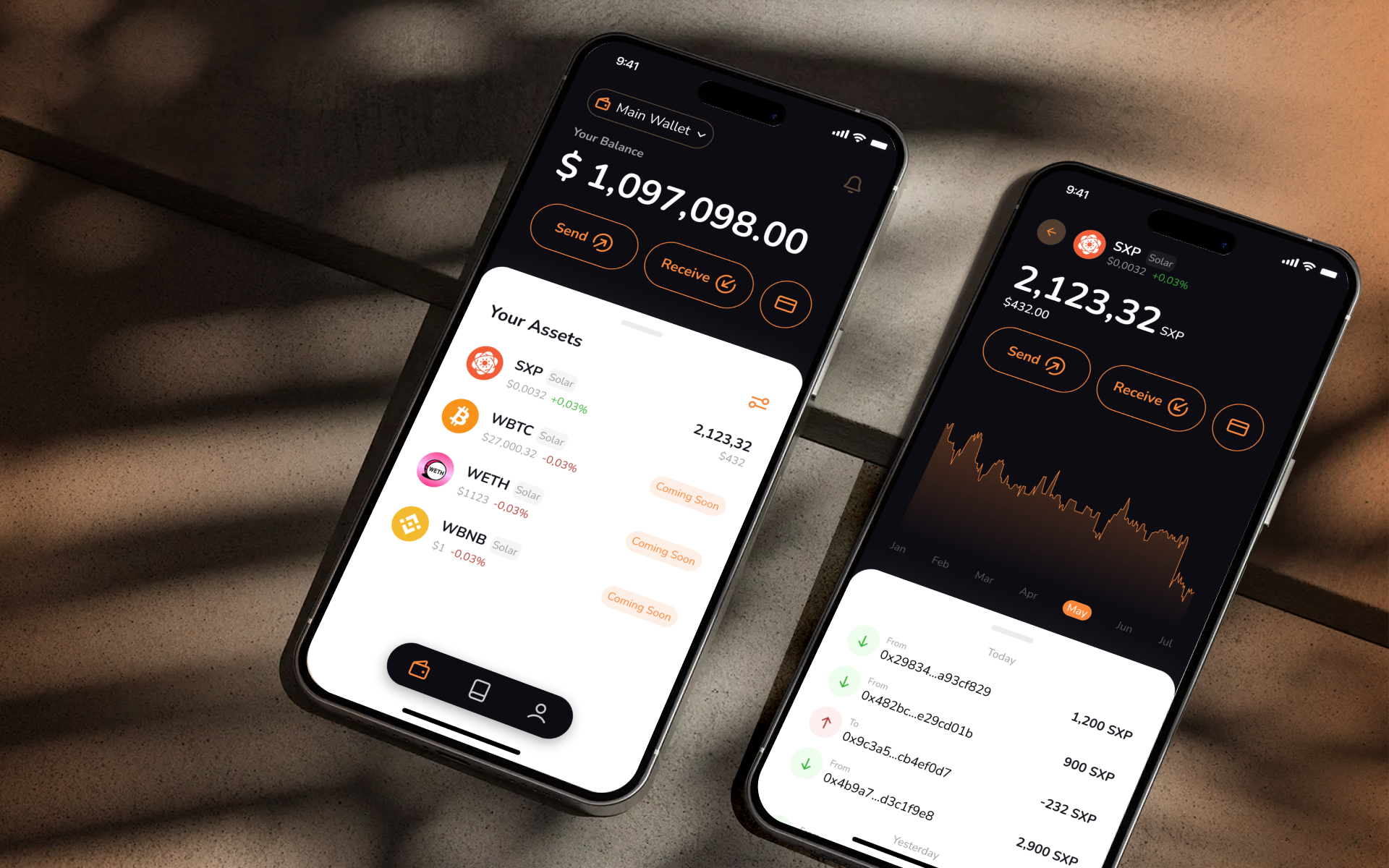
Managing crypto should be simple, even when you’re on the go. Solar Wallet is a non-custodial, multi-chain crypto wallet that lets users store, send, and receive digital assets safely. Until now, advanced features were only available on desktop — but our challenge was bringing all that power to mobile, making transactions, wallet management, and multi-currency handling seamless and convenient.
Approach
I analyzed the desktop wallet flow, prioritized key features for mobile, and explored familiar design patterns to make interactions intuitive. After mapping user flows and creating wireframes, I crafted a clean, fast, and secure interface — keeping advanced crypto functionality accessible on the go.
Outcome
I delivered high-fidelity designs, complete with interaction flows and detailed specifications, ready for the development team to implement. The handoffs ensured the mobile wallet retained all essential features from the desktop app while providing a smooth, secure, and intuitive user experience.
I designed the main homepage, asset pages, token lists, and custom token flows to make managing crypto intuitive and accessible.
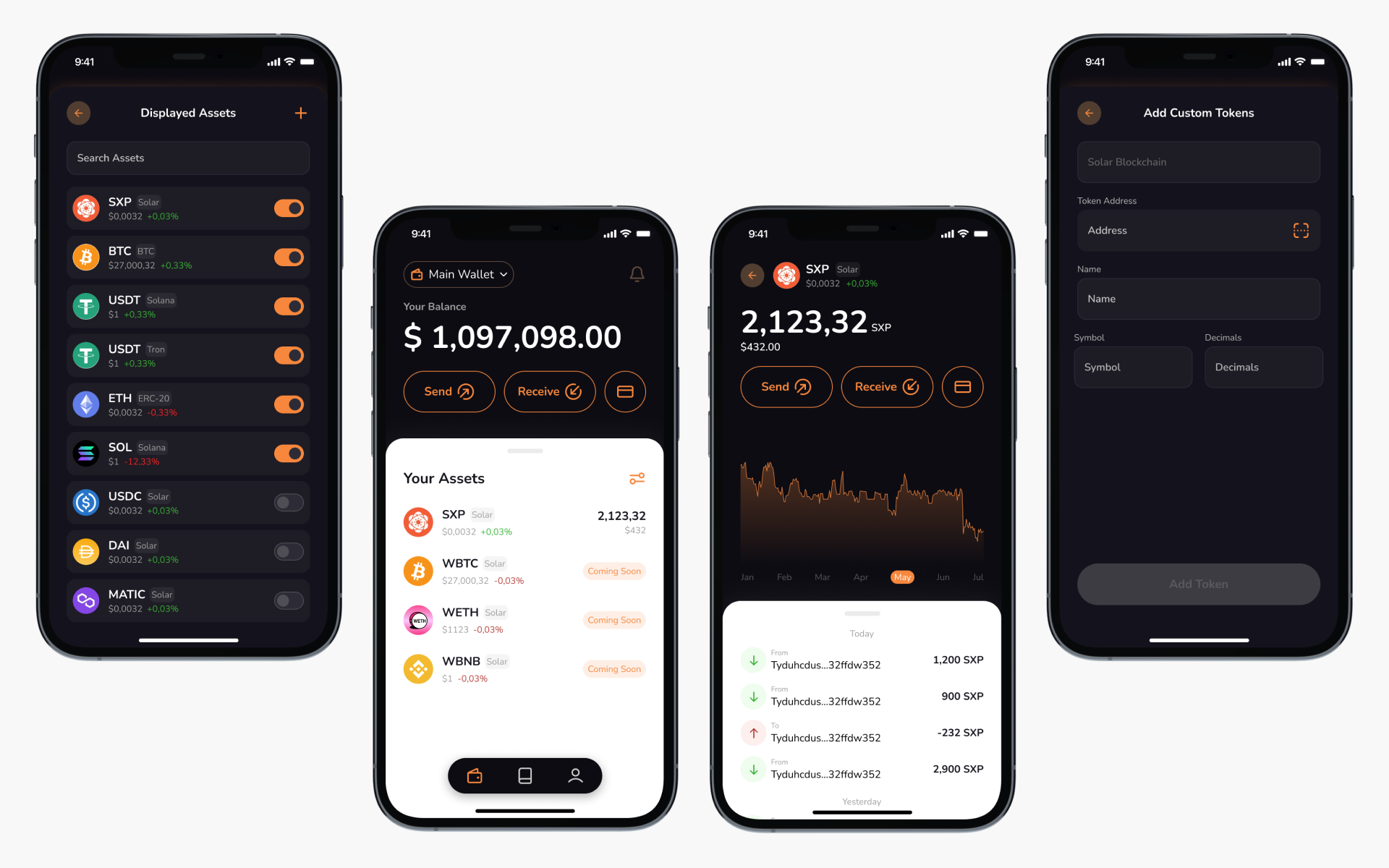
I designed the main homepage, asset pages, token lists, and custom token flows to make managing crypto intuitive and accessible.
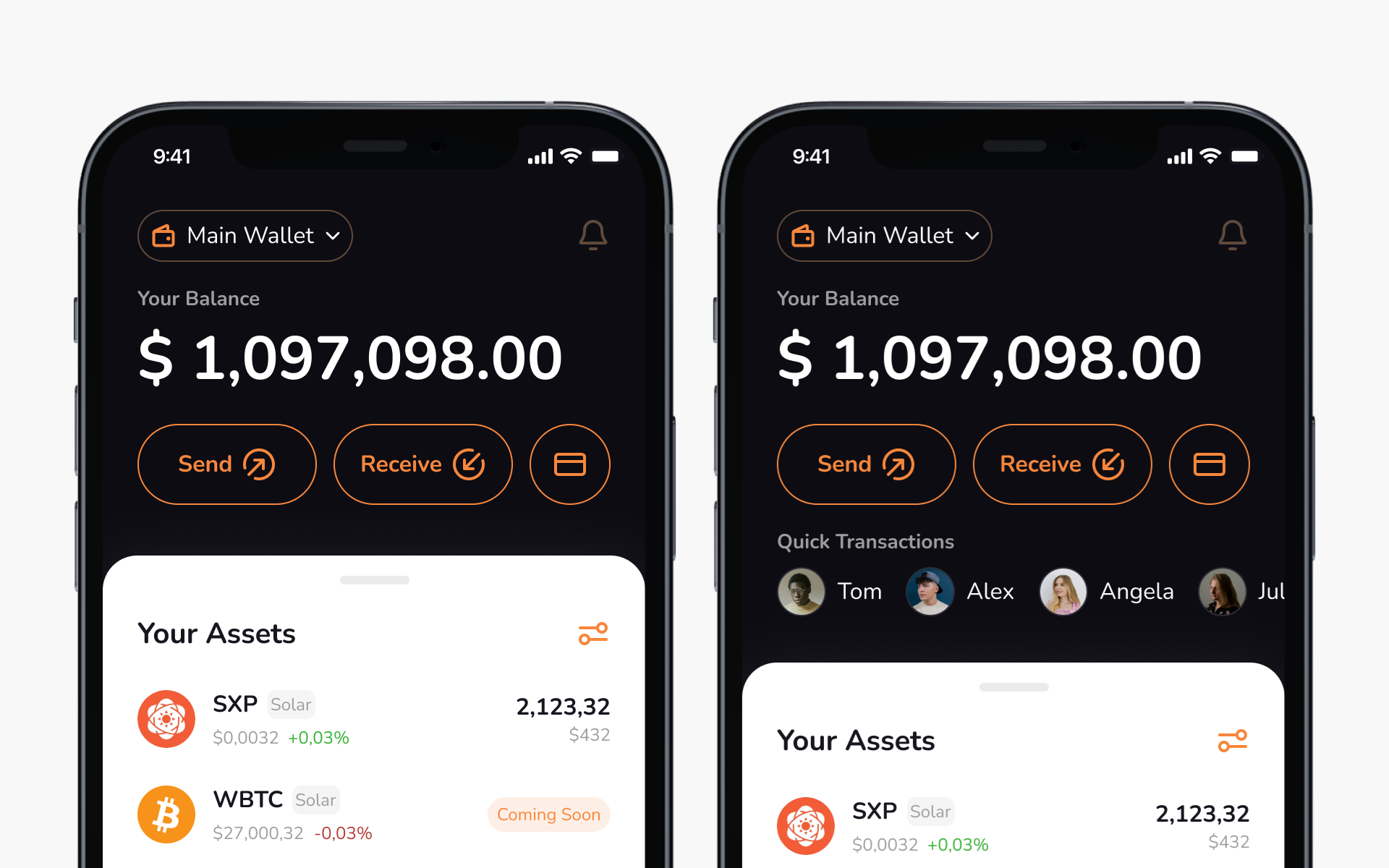
Users can switch between wallets. Visual wallet summary: balance + key actions: send, receive, and top up; assets list
Wallet Overview
The Wallet Overview brings all users balances across multiple chains into one clear view. Users can send, receive, and top up assets with ease, and switch between wallets seamlessly.
Send Flow: Send single, select contact, transaction fee and overview
Send SXP flow
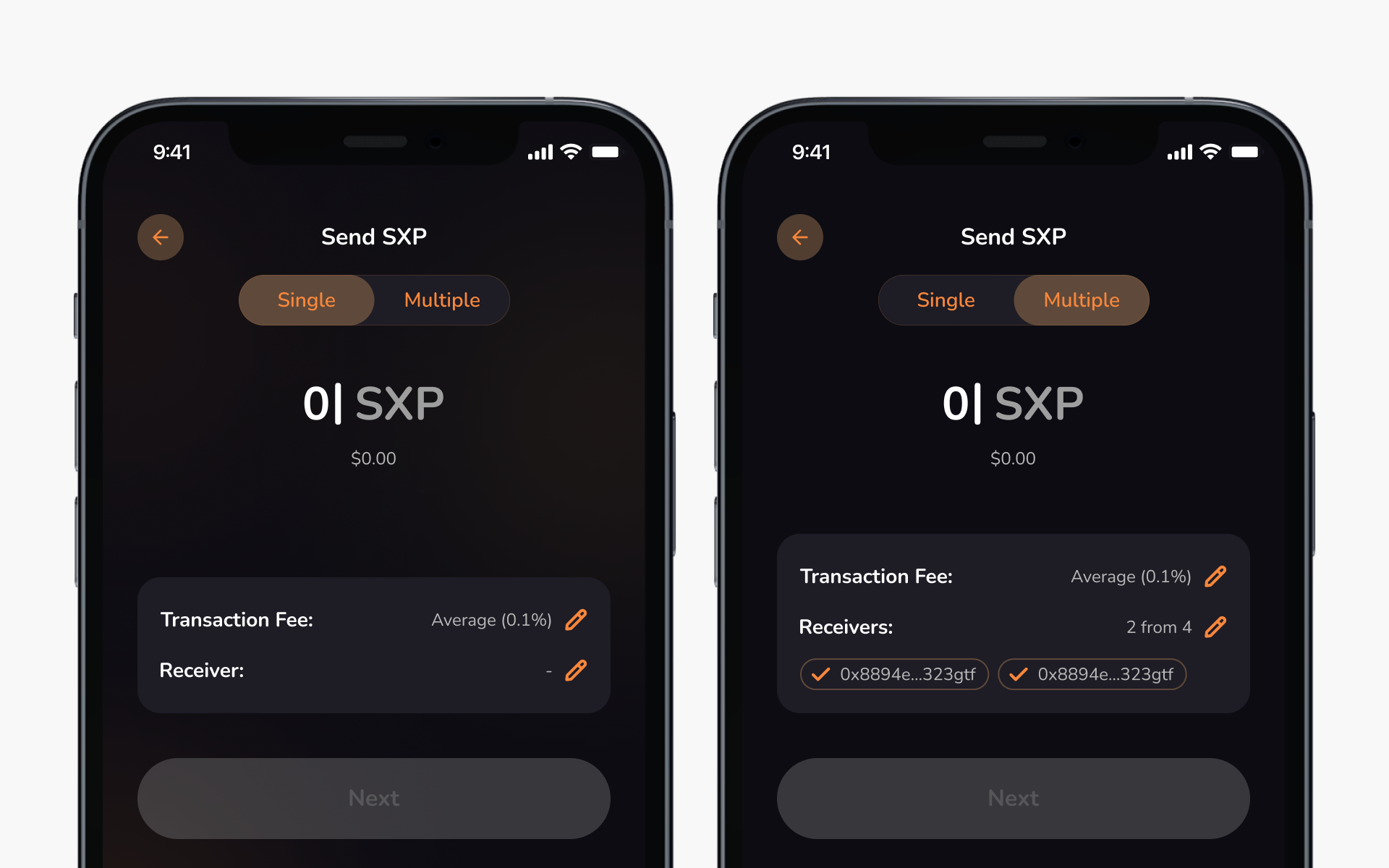
I kept the advanced desktop feature that allows users to send assets to single or multiple wallets in one flow. The challenge was making this functionality intuitive on mobile.
Single & Multiple Send Modes
Send SXP
Users can easily switch between sending to one wallet or multiple recipients within the same flow. This design keeps the interface minimal while preserving advanced flexibility.
User wallet
User Wallet
The User Wallet screen provides quick access to user wallet address and details, making it easy to share or review. From here, users can rename their wallet, add extra protection with a mnemonic phrase, or export their wallet securely.
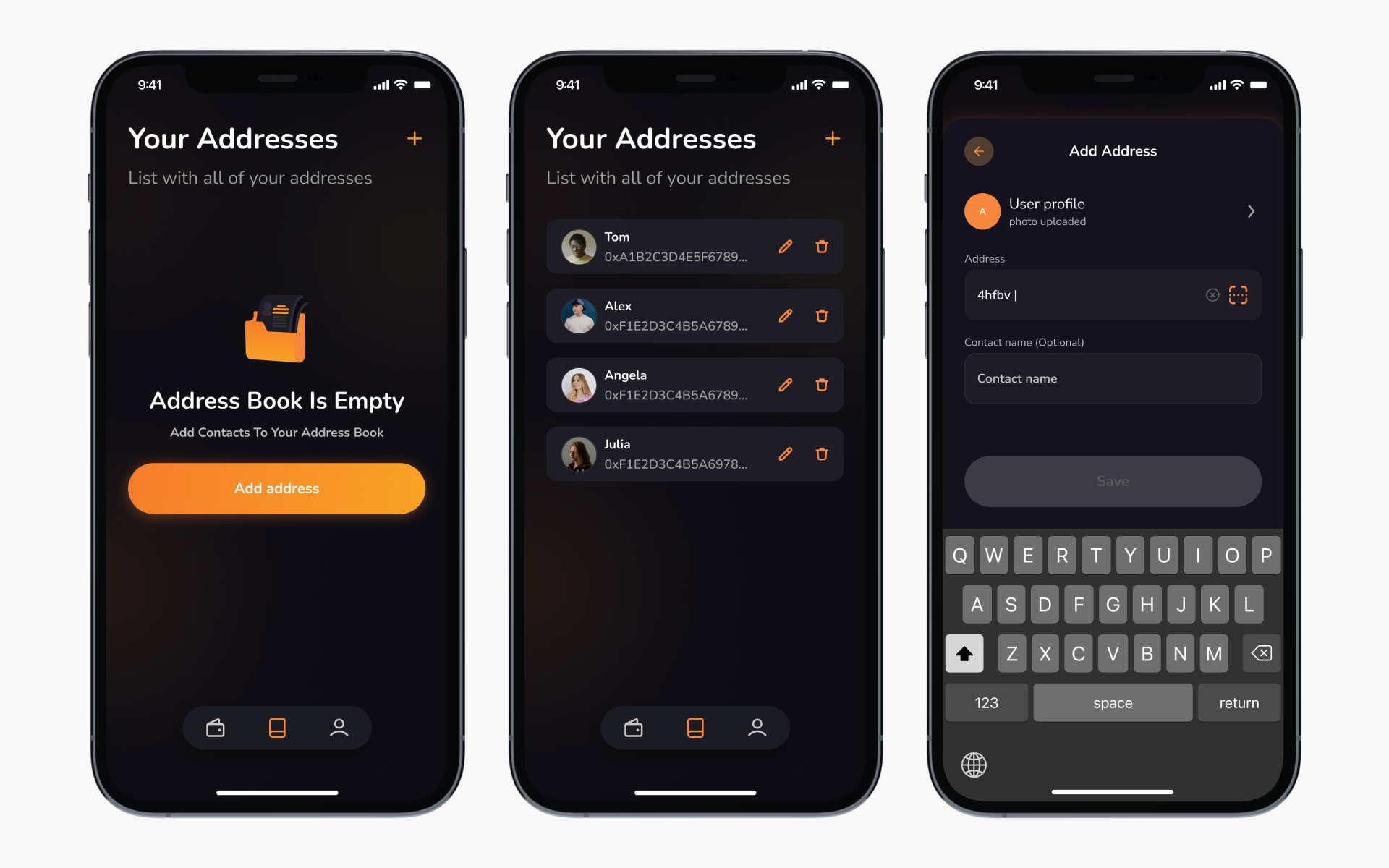
Address book: empty state, list of contacts and add contact.
Address book
The Address Book lets users easily browse and manage their saved wallet addresses. New wallets can be added in just a few taps, making transactions faster and more reliable, especially for users managing multiple accounts or frequent transfers.
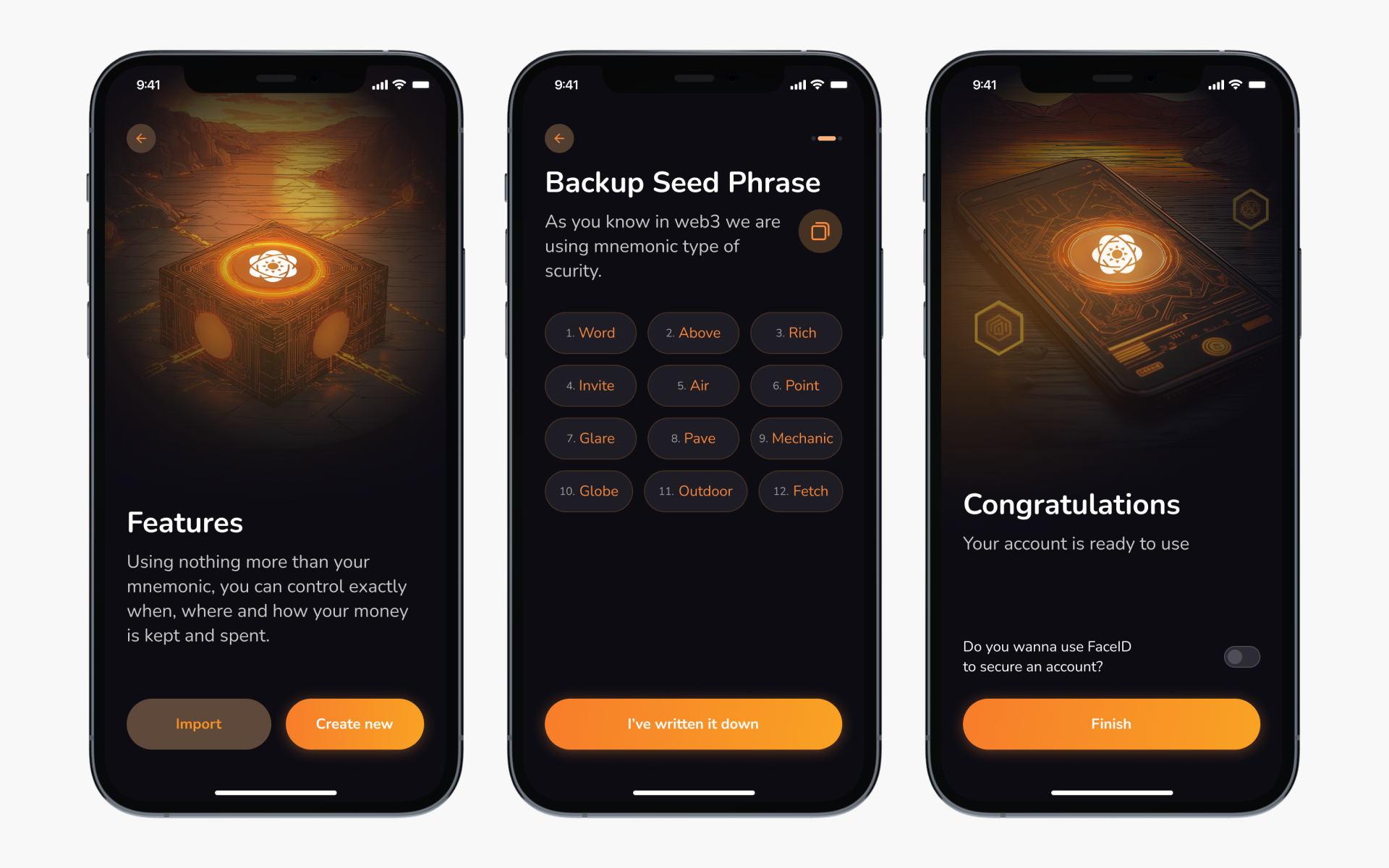
Onboarding Flow: Create or Import Wallet
Onboarding
Users can quickly create a new wallet or import an existing one using a seed phrase. The process highlights security best practices and supports biometric login for fast, secure access.
Settings: switch themes, adjust security options, and manage preferences. Advanced users can also export private keys or set default chains.
Settings
The Settings section gives users full control over their app experience. Advanced users can manage block producers, adjust peer connections, and customize transaction signing options.
Outcome
I designed six clear user flows covering all key wallet actions — from onboarding and transactions to wallet management and settings. Complex desktop interactions were simplified for mobile, keeping the experience intuitive and fast.
I prototyped and tested the flows with colleagues to ensure clarity, consistency, and smooth navigation across screens. The final delivery included a clean, scalable dark-mode UI, fully prepared for developer handoff and future updates.
Turning a powerful desktop crypto wallet into a smooth mobile experience
Description
Managing crypto should be simple, even when you’re on the go. Solar Wallet is a non-custodial, multi-chain crypto wallet that lets users store, send, and receive digital assets safely. Until now, advanced features were only available on desktop — but our challenge was bringing all that power to mobile, making transactions, wallet management, and multi-currency handling seamless and convenient.
Approach
I analyzed the desktop wallet flow, prioritized key features for mobile, and explored familiar design patterns to make interactions intuitive. After mapping user flows and creating wireframes, I crafted a clean, fast, and secure interface — keeping advanced crypto functionality accessible on the go.
Outcome
I delivered high-fidelity designs, complete with interaction flows and detailed specifications, ready for the development team to implement. The handoffs ensured the mobile wallet retained all essential features from the desktop app while providing a smooth, secure, and intuitive user experience.
I designed the main homepage, asset pages, token lists, and custom token flows to make managing crypto intuitive and accessible.
I designed the main homepage, asset pages, token lists, and custom token flows to make managing crypto intuitive and accessible.
Users can switch between wallets. Visual wallet summary: balance + key actions: send, receive, and top up; assets list
Wallet Overview
The Wallet Overview brings all users balances across multiple chains into one clear view. Users can send, receive, and top up assets with ease, and switch between wallets seamlessly.
Send Flow: Send single, select contact, transaction fee and overview
Send SXP flow
I kept the advanced desktop feature that allows users to send assets to single or multiple wallets in one flow. The challenge was making this functionality intuitive on mobile.
Single & Multiple Send Modes
Send SXP
Users can easily switch between sending to one wallet or multiple recipients within the same flow. This design keeps the interface minimal while preserving advanced flexibility.
User wallet
User Wallet
The User Wallet screen provides quick access to user wallet address and details, making it easy to share or review. From here, users can rename their wallet, add extra protection with a mnemonic phrase, or export their wallet securely.
Address book: empty state, list of contacts and add contact.
Address book
The Address Book lets users easily browse and manage their saved wallet addresses. New wallets can be added in just a few taps, making transactions faster and more reliable, especially for users managing multiple accounts or frequent transfers.
Onboarding Flow: Create or Import Wallet
Onboarding
Users can quickly create a new wallet or import an existing one using a seed phrase. The process highlights security best practices and supports biometric login for fast, secure access.
Settings: switch themes, adjust security options, and manage preferences. Advanced users can also export private keys or set default chains.
Settings
The Settings section gives users full control over their app experience. Advanced users can manage block producers, adjust peer connections, and customize transaction signing options.
Outcome
I designed six clear user flows covering all key wallet actions — from onboarding and transactions to wallet management and settings. Complex desktop interactions were simplified for mobile, keeping the experience intuitive and fast.
I prototyped and tested the flows with colleagues to ensure clarity, consistency, and smooth navigation across screens. The final delivery included a clean, scalable dark-mode UI, fully prepared for developer handoff and future updates.
Turning a powerful desktop crypto wallet into a smooth mobile experience
Description
Managing crypto should be simple, even when you’re on the go. Solar Wallet is a non-custodial, multi-chain crypto wallet that lets users store, send, and receive digital assets safely. Until now, advanced features were only available on desktop — but our challenge was bringing all that power to mobile, making transactions, wallet management, and multi-currency handling seamless and convenient.
Approach
I analyzed the desktop wallet flow, prioritized key features for mobile, and explored familiar design patterns to make interactions intuitive. After mapping user flows and creating wireframes, I crafted a clean, fast, and secure interface — keeping advanced crypto functionality accessible on the go.
Outcome
I delivered high-fidelity designs, complete with interaction flows and detailed specifications, ready for the development team to implement. The handoffs ensured the mobile wallet retained all essential features from the desktop app while providing a smooth, secure, and intuitive user experience.
I designed the main homepage, asset pages, token lists, and custom token flows to make managing crypto intuitive and accessible.
I designed the main homepage, asset pages, token lists, and custom token flows to make managing crypto intuitive and accessible.
Users can switch between wallets. Visual wallet summary: balance + key actions: send, receive, and top up; assets list
Wallet Overview
The Wallet Overview brings all users balances across multiple chains into one clear view. Users can send, receive, and top up assets with ease, and switch between wallets seamlessly.
Send Flow: Send single, select contact, transaction fee and overview
Send SXP flow
I kept the advanced desktop feature that allows users to send assets to single or multiple wallets in one flow. The challenge was making this functionality intuitive on mobile.
Single & Multiple Send Modes
Send SXP
Users can easily switch between sending to one wallet or multiple recipients within the same flow. This design keeps the interface minimal while preserving advanced flexibility.
User wallet
User Wallet
The User Wallet screen provides quick access to user wallet address and details, making it easy to share or review. From here, users can rename their wallet, add extra protection with a mnemonic phrase, or export their wallet securely.
Address book: empty state, list of contacts and add contact.
Address book
The Address Book lets users easily browse and manage their saved wallet addresses. New wallets can be added in just a few taps, making transactions faster and more reliable, especially for users managing multiple accounts or frequent transfers.
Onboarding Flow: Create or Import Wallet
Onboarding
Users can quickly create a new wallet or import an existing one using a seed phrase. The process highlights security best practices and supports biometric login for fast, secure access.
Settings: switch themes, adjust security options, and manage preferences. Advanced users can also export private keys or set default chains.
Settings
The Settings section gives users full control over their app experience. Advanced users can manage block producers, adjust peer connections, and customize transaction signing options.
Outcome
I designed six clear user flows covering all key wallet actions — from onboarding and transactions to wallet management and settings. Complex desktop interactions were simplified for mobile, keeping the experience intuitive and fast.
I prototyped and tested the flows with colleagues to ensure clarity, consistency, and smooth navigation across screens. The final delivery included a clean, scalable dark-mode UI, fully prepared for developer handoff and future updates.